

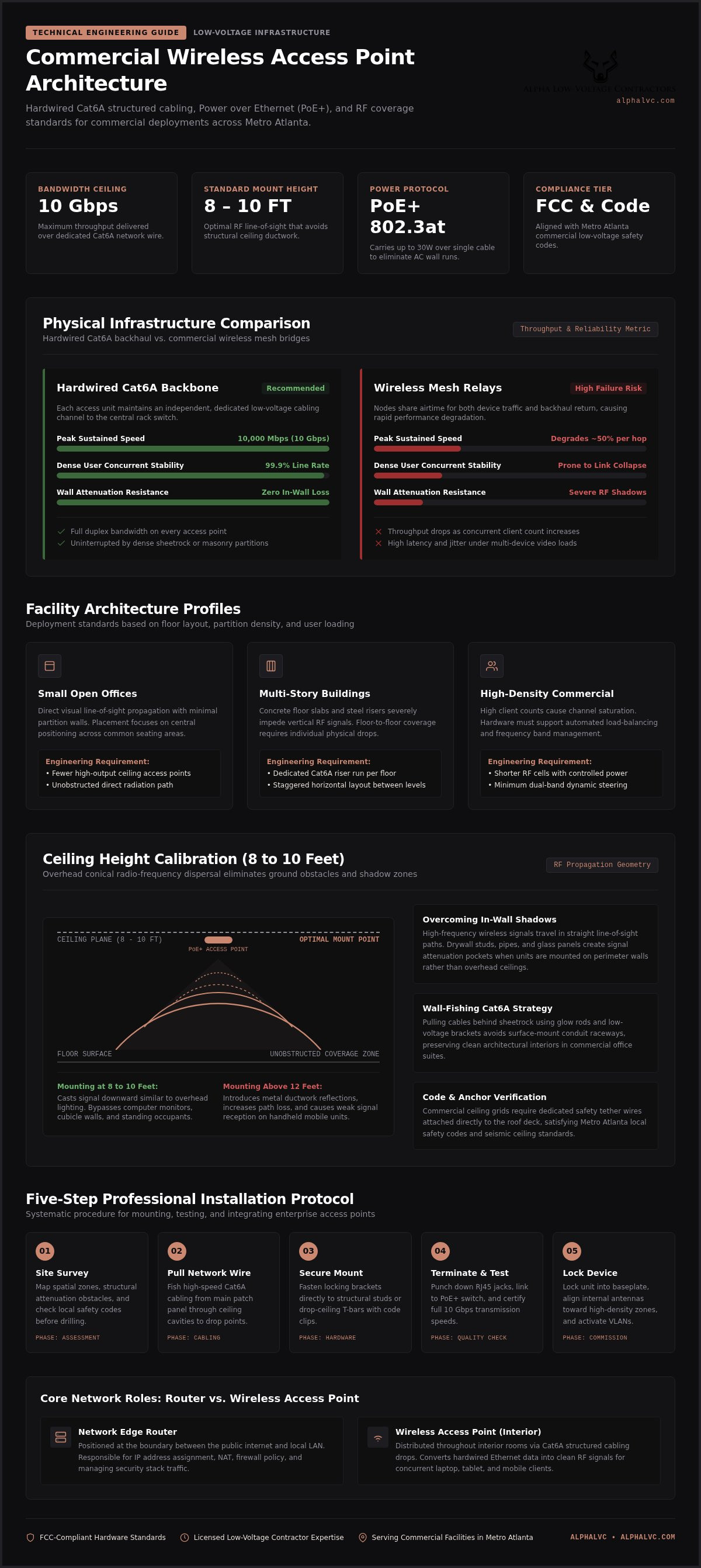
Deploying dedicated wifi access (wireless access point) units over hardwired network wire (Cat6A) delivers up to 10 Gbps speeds and eliminates wireless dead zones. Proper installation requires selecting the right Power over Ethernet hardware and mounting units at 8 to 10 feet for optimal RF propagation across Metro Atlanta properties. You can rely on AlphaLVC (https://alphalvc.com) for expert layout design and network integration.
Key Takeaways: Install hardwired access points at 8 to 10 feet using Cat6A cabling and PoE+ switches to achieve stable 10 Gbps wireless coverage.
- Mount hardware at 8 to 10 feet to ensure optimal RF propagation across floors.
- Except when using temporary or small office spaces where basic plug-and-play extenders suffice.
- Hardwire every ceiling unit with Cat6A rather than relying on wireless mesh bridges.
- The article notes that throughput collapsed in dense mesh environments until physical wiring was restored.
Three Site Types That Shape Your Network Architecture
Your layout choice starts with square footage, physical barriers, and user density, not with a hardware brand preference. Mesh wireless setups fail under heavy commercial demands: when client sites pushed dense concurrent users through mesh bridges, throughput collapsed, so the fix was running physical network wire directly to each point, which restored stable links and supported the speed headroom those floors required (up to 10 Gbps on Cat6A).
Use these three site profiles as a quick guide:
- Small open offices: basic point coverage is enough; place fewer units where sight lines stay clear.
- Multi-story buildings: hardwire a link on every floor so each level has its own backbone drop.
- High-density floors: specify load-balancing access hardware so concurrent clients share capacity cleanly.
Poor placement drops speeds. Wireless signals behave like light in a room: walls cast hard shadows where RF cannot reach. Hardwired drops prevent those dead zones because each wifi access has a dedicated data path.
Choosing professional security integration protects your business operations. AlphaLVC delivers reliable local installations across Metro Atlanta so your security stack stays online. Structured cabling outperforms pure wireless for permanent commercial floors.
Tip: Assess your physical layout and bandwidth demands before buying hardware to avoid unnecessary upgrades.
A Router Directs Traffic; an Access Point Extends Wi-Fi
A router handles your network's IP addresses; a wireless access point connects devices through Wi-Fi access point once it joins the LAN.
An access point sits on the local area network and broadcasts wireless signals to clients. A router acts as the traffic controller at the network edge; an access point acts as an additional entry for wireless devices deeper inside the building. Routers suit basic home setups, while dedicated access points fit expanding Metro Atlanta commercial properties that need solid interior coverage.
| Feature | Router | Wireless Access Point |
|---|---|---|
| Primary Function | Directs traffic between networks | Connects wireless clients |
| Network Location | Boundary between internet and LAN | Placed throughout interior spaces |
| Data Backbone | Single gateway hardware | Linked via network wire |
For stack-level protection, pair the wireless layer with access control installation on the same campus. Professionally installed cables (structured cabling) hold peak data rates steady under load.
Wall-Fishing Cat6A Keeps Finished Rooms Free of Exposed Cable
Wall-fishing routes network wire through concealed wall cavities so a wifi access mounts cleanly with no exposed runs. Hiding cable inside finished drywall preserves room aesthetics while keeping a reliable physical connection.
Technicians recommend hardwiring every ceiling unit rather than relying on wireless mesh bridges. Mesh signals degrade through dense sheetrock; dedicated low-voltage cabling holds throughput and stability on the wired path.
Tight cavities, stacked top plates, and crowded stud bays often stop standard fish tape. Flexible glow rods and small top-plate drill bits let you navigate those paths, and precise low-voltage ring openings let you pull cables safely behind sheetrock without tearing large drywall sections during retrofit work.
Routing lines through attics or crawlspaces keeps hardware tied directly to core network switches. If your facility also needs door-side security on the same backbone, combine hardwired network drops with office access control.
Expert technicians use scope cameras to locate hidden studs, plumbing, and high-voltage electrical lines before drilling top plates. Licensed local professionals keep the work aligned with local safety codes and FCC-compliant hardware standards across Metro Atlanta.
Five Mounting Steps That Protect Coverage and Hardware Safety
Physical placement sets both signal reach and equipment safety across your facility. Mounting at sound ceiling heights reduces obstruction in open work areas, and hardwired links stay more stable than wireless backhaul in commercial environments.
- Conduct the site survey: Map coverage zones and check local safety codes to lock exact placement.
- Run network wire: Pull high-speed cables from your main server rack to each location.
- Attach the mounting bracket: Secure the bracket to a ceiling grid or solid wall studs with proper anchors.
- Terminate and test: Plug the cable into the unit to confirm power delivery and data transmission speed.
- Secure the device: Lock the wifi access onto its plate, aiming internal antennas toward high-density user zones.
Ceiling mounts cast coverage downward the way overhead lighting covers a floor, so wall barriers block less of the RF path. You can review how network hardware ties into door hardware in this Atlanta access control guide. Hardwired setups fit permanent commercial properties; mesh fits temporary office spaces. AlphaLVC provides full professional installation so the network meets operational standards. AlphaLVC crews stage each drop against your floor plan before final mount.
PoE and VLANs Separate Power Delivery from User Traffic
Power over Ethernet switch gear removes the need for extra electrical outlets at each wifi access. Power-budget miscalculations stall deployment timelines, so you calculate total wattage for every device before you buy switch hardware.
Standard switches cost less at purchase, yet separate injectors raise the part count. A PoE+ switch sends power through network wire and cuts that extra gear, which simplifies maintenance for Metro Atlanta commercial facilities.
Network segmentation keeps administrative traffic apart from public users. Isolated VLANs function as separate corridors: guest devices stay on their path, and secured resources stay on theirs.
Cables must carry the current draw without excess signal loss. Long-term hardware planning lowers operating cost over the life of the switch stack. Request a personalized quote from AlphaLVC.com so switch capacity matches your device count. Professional installation keeps PoE budgets and VLAN maps aligned.
Heatmap Walk-Throughs Prove Coverage After You Mount
After you mount hardware, measure signal strength with professional survey software. Load the floor plan, set scale, and walk every zone with the test device so the heatmap reflects real rooms rather than a paper plan.
Interior walls and physical obstructions attenuate radio frequencies unevenly, so post-installation validation is how you catch weak cells before users do. Gather real-time data points across high-density areas; untreated degradation leaves blind spots that a desk test will miss.
Your wifi access needs correct power levels so cells do not overlap into noise. Connect the survey tool to the cloud-based management system, review throughput, and run tests under simulated user loads. High-density zones need deliberate channel assignment.
If coverage falls below your threshold, adjust power inside the management console. When data rates still fluctuate, recheck network wire terminations: reliable cables feed stable data to each radio. Coordinate full system validation for Metro Atlanta facilities through the team at AlphaLVC when you want a second pass on the heatmap.
When Dedicated Access Points Are the Wrong Choice
Plug-and-play extenders suit temporary spaces; hardwired access points remain the right backbone for high-density commercial networks.
Hardware selection gets confusing when the site is small and short-lived. If you only need temporary coverage on a compact floor, enterprise units add cost you will not use. Basic routers handle light traffic. Growing offices, though, need steady throughput: dropped signals interrupt daily operations.
For permanent facilities, low-voltage cabling is the backbone. Connecting dedicated hardware through network wire removes multi-room wireless backhaul interference. Align that hardware with your broader security stack so badge, camera, and wireless layers share one design.
Professional installation is how you protect uptime. AlphaLVC integrates wireless access point systems with 24/7 Professional Monitoring so your facility stays covered across Metro Atlanta. Visit AlphaLVC.com when you are ready to evaluate infrastructure requirements. Hardwired infrastructure supports long-term operational stability.
Channel Overlap Fixes Restore Lost Throughput
Post-installation RF problems show up when you scan the 2.4 GHz and 5 GHz bands for congestion. Overlapping frequencies drive packet loss.
Retuning channel assignments clears most throughput drops. High transmission power often worsens co-channel interference by flooding neighboring cells with noise; lowering radio output balances coverage cells across your wifi access network.
Verify that cables deliver adequate Power over Ethernet to every unit. Low voltage causes random reboots and failed IP assignment.
Prefer hardwired network wire runs over wireless mesh when you need stable bandwidth for Metro Atlanta commercial security installations. Contact AlphaLVC at AlphaLVC.com when the RF environment needs a structured remediation plan.
Frequently asked questions
Can you connect an access point directly to a router?
You can connect a device for wifi access directly to a router using standard network wire. That single cable carries power and data so link speed stays consistent. Professional installation ties the hardware into your security stack without dropped packets. On complex commercial sites across Metro Atlanta, structured cabling gives continuous data processing a fixed foundation. Ask AlphaLVC for a layout review when you want the run count sized to your floor plate.
How do I set up a wireless access point using my router?
Run cables from your router to the unit location, then configure network settings, a static IP address, and matching security credentials. Hardwired access points avoid the signal loss common in mesh-only office wireless, which matters for commercial security traffic. Certified technicians perform a site survey to place hardware clear of physical obstruction and neighboring RF sources. Reach AlphaLVC for a professional access control consultation when you need enterprise coverage scoped end to end.
What is the difference between a router and a wireless access point?
A router manages internal IP traffic and connects local networks to the external internet. The dedicated wireless access point broadcasts the wireless signal to end-user devices throughout the facility. Routers direct data flows at the edge; access points expand wireless coverage inside the LAN. Integrating hardwired wireless equipment into your local layout maintains fast speeds for video transmission and remote management systems.
Does a wireless access point have its own IP address?
A commercial wireless access point requires its own unique IP address for administrative management. Assigning a static IP address lets administrators manage remote access, update firmware, and review audit trails without collision risk. Static assignment prevents IP conflicts across your corporate network infrastructure and protects overall network reliability.
What settings should I adjust after installation?
Adjust broadcast channels, transmission power levels, and security encryption protocols right after Wi-Fi access point installation. Those changes reduce signal overlap and block unauthorized access to internal resources. Compliance with local safety codes and FCC-compliant hardware standards keeps operation within required limits. You can pair network monitoring with 24/7 Professional Monitoring so the physical enterprise and the wireless layer share one oversight path.
Secure Your Network Infrastructure in 2026
Proper Wi-Fi access point installation gives your business fast, reliable wireless coverage only when the wired foundation is right. Running low-voltage cabling to every hardware location prevents dead zones and supports your commercial security stack; wireless coverage alone cannot replace that hardwired path.
The AlphaLVC team brings certified low-voltage contractor expertise to each site. Technicians design and deploy network hardware aligned with local safety codes across Metro Atlanta, and you receive stable connectivity integrated with your physical security infrastructure.
Poor cable work bottlenecks the rest of the enterprise system. To upgrade your hardware setup, contact AlphaLVC today for a detailed site assessment and quote.


