

When an alarm or camera flags activity at your business, who acts next, and how does the alert become a response? That question is central to security monitoring for businesses. Connected devices are only part of the picture. You also need to know what each alert means, who reviews it, and who is responsible for the next step.
If you’re unsure whether professional monitoring can work with your existing equipment or fit your hours, entry points, and staff procedures, start by mapping how your location operates. This guide explains the monitoring and response workflow, how alarms, cameras, access control, and network connections can work together, and what to review during a site survey. It also covers questions to ask a professional installer in Metro Atlanta so you can assess whether a proposed setup fits your needs.
Key Takeaways
- Security monitoring for businesses works best when each alert has a defined path from detection to review and an agreed response. Confirm exactly what the provider does when an alert comes in.
- Match coverage to your operating hours, entry points, sensitive areas, and the people authorized to act on alerts.
- Review how alarms, surveillance cameras, access control, and structured cabling connect before deciding whether existing equipment can support your plan.
- Remote management and cloud-based management help you oversee devices, but they are not the same as confirmed professional monitoring.
How security monitoring for businesses turns alerts into a response
Professional monitoring means a monitoring service receives designated security signals and follows agreed procedures for review and notification. It differs from camera recording, which stores footage, and remote management, which lets an authorized user view or control devices from another location.
Business monitoring routes selected alerts through a defined process; it doesn’t guarantee that every event will be detected, verified, or resolved. Before service begins, ask the provider to explain the exact steps and limits for your system.
What happens after a business security alert?
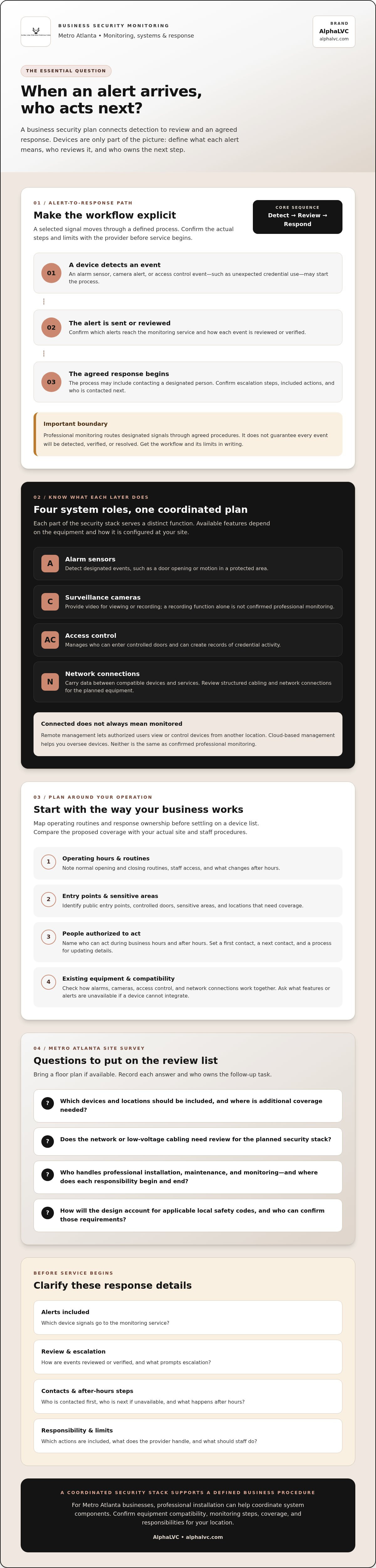
An event may begin with an alarm sensor, a surveillance camera alert, or an access control event, such as unexpected credential use. Depending on the equipment and service, the general path is: a device detects an event, a notification is sent or the event is reviewed, and the agreed response process begins. That process might include contacting a designated person, but confirm the provider’s actual procedures.
Make responsibilities specific. Ask which alerts go to the monitoring service, how events are reviewed or verified, what prompts escalation, and which actions are included. Confirm who is contacted first, who is next if that person cannot be reached, and how contact details are updated. Check what happens after hours, too. Don’t assume camera analytics, remote access, or an alarm notification automatically includes professional review.
For network security, Security Information and Event Management (SIEM) describes a separate approach to collecting and analyzing security event data. It helps illustrate why receiving a technology alert is not, by itself, a complete response plan.
For a Metro Atlanta business, professional installation can help coordinate the security stack, but compatibility with existing equipment and the provider’s monitoring steps still need to be confirmed. Get the workflow in writing so staff know which alerts they may receive and what to do next.
How to assess business security monitoring before you choose
Start with how your business operates, not with a device list. Note normal opening and closing routines, staff access, public entry points, and sensitive areas. Factoring in routine after-hours vendors—such as commercial upkeep services like AlphaLux Cleaning—helps ensure scheduled visits do not trigger false alarms. Identify who can act on an alert during business hours and after hours. Then compare that routine with the proposed coverage: which locations generate alerts, who receives them, and who is expected to follow up? A system that overlooks these details may send alerts to the wrong people or leave important areas outside the plan.
Monitoring needs site-specific planning because each location has different entry points, equipment, schedules, and response responsibilities. For a foundational overview, see DeVry University’s guide to security monitoring for businesses.
Before choosing a service, check how your current alarms, surveillance cameras, and access control communicate. Review whether structured cabling and network connections can support the equipment you plan to use. Whether working with local installers or established specialists like Q-Winn Security, ask the provider to check compatibility rather than assuming existing or third-party devices will work. Find out which features or alerts are unavailable if a device cannot integrate.
Questions to bring to a Metro Atlanta site survey
Use a site survey to turn concerns into a practical coverage plan. Bring a floor plan if available, and ask:
- Which devices and locations should be included, and what areas need additional coverage?
- Does the network or low-voltage cabling need review for the planned security stack?
- Who handles professional installation, maintenance, and monitoring, and where does each responsibility begin and end?
- How will the design account for applicable local safety codes, and who can confirm those requirements?
Record the answers and note who owns each follow-up task. A professional site survey in Metro Atlanta can help you review your requirements with a local provider. Discuss your business security needs with AlphaLVC.
How an integrated security stack supports business monitoring
Each part of a security stack has a distinct role. Alarm sensors detect designated events, such as a door opening or motion in a protected area. Surveillance cameras provide video for viewing or recording. Access control manages who can enter through controlled doors and can create records of credential activity. Network connections carry data between compatible devices and services. The functions available depend on the equipment and its configuration at your site.
A coordinated security stack links appropriate devices to defined business procedures. Integration may help connect an event with relevant information, but confirm which devices can communicate and what actions the service includes. For businesses reviewing digital threats as well as physical security, DeVry University offers an overview of cybersecurity monitoring.
Remote management lets authorized users access or control devices from another location. Cloud‑based management provides an internet-hosted way to administer security devices. Neither term, by itself, means a professional monitoring service receives alerts, reviews them, or follows an agreed response process. Confirm those details separately.
When to involve a professional installer and monitoring provider
AlphaLVC installs security systems, surveillance cameras, and access control, and provides 24/7 professional monitoring for commercial customers in Metro Atlanta. A site survey can help you discuss your location, existing equipment, and preferred monitoring process. Ask what the proposed setup supports and what remains your team’s responsibility before selecting a plan.
Build a Response Plan That Fits Your Business
Reliable security monitoring for businesses depends on more than receiving an alert. Define who reviews each event, who gets notified, and what response your team and provider have agreed on. Review operating hours, entry points, existing equipment, and network connections so the security stack fits the way your location works.
Professional installation and maintenance can help keep alarms, surveillance cameras, access control, and monitoring coordinated. AlphaLVC provides 24/7 professional monitoring and serves businesses across Metro Atlanta.
Start by reviewing your equipment and response procedures. Discuss business security monitoring with AlphaLVC and take a practical next step toward a plan that works for your team.
Frequently Asked Questions
What is security monitoring for businesses?
Security monitoring for businesses is a service that receives or reviews security events from a business system and follows an agreed notification or response process. The steps depend on the provider, equipment, and service terms. Ask which events are monitored, how alerts are reviewed, who is contacted, and what actions are included so you know what to expect after an alert.
Does professional monitoring work if a business is closed?
Professional monitoring may be available outside your business hours, but confirm the provider’s coverage, event handling, and contact procedures. Keep authorized contact details current and decide who can respond to notifications. Ask what happens if the first contact doesn’t respond. Don’t assume every alert leads to the same action or that a particular response time is guaranteed.
Can business monitoring work with existing security cameras and access control?
It depends on your equipment, network, and provider capabilities. Ask a professional installer to review device compatibility and explain how camera events, alarm signals, and access records could work together. A site survey can identify which equipment may remain in place and whether changes are needed. Confirm any limits before choosing a monitoring service.
How do I choose a business security monitoring provider in Metro Atlanta?
Start with your operating hours, entry points, existing equipment, and alert-response responsibilities. Ask about professional installation, maintenance, monitoring procedures, device compatibility, and how the design will account for applicable local safety codes. Request a site survey to review your actual location and business needs. AlphaLVC serves Metro Atlanta with security systems, access control, surveillance cameras, and 24/7 professional monitoring.


