
What if you can view a camera feed remotely but still have no one responsible for reviewing an alert? Remote video monitoring can mean viewing footage through an app, while 24/7 professional monitoring is a separate service with terms you should confirm. Before choosing a setup, check whether you can view live video, review recordings, receive alerts, or all three. Also consider what happens if the property loses connectivity and where cameras can be placed.
A useful setup depends on more than camera access. It needs planned coverage, reliable connectivity, clear privacy practices, and a response process. This guide explains what remote video monitoring can and cannot do, what to check in cameras, network connectivity, storage, privacy, and response procedures, and how professional installation can coordinate coverage, low-voltage cabling, and monitoring. Use it to assess equipment or a service and plan a system for your Metro Atlanta property.
Key Takeaways
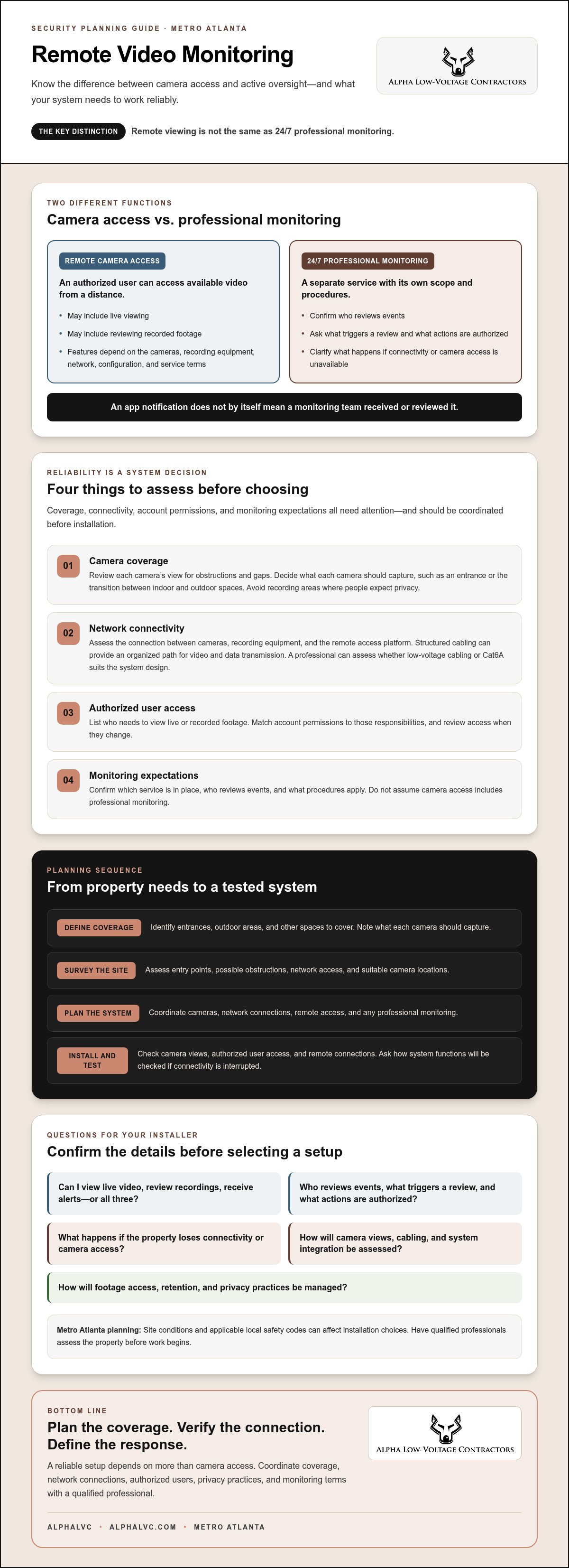
- Remote video monitoring may let you view camera feeds from a distance, but it isn’t the same as 24/7 professional monitoring. Confirm what each service includes.
- Before choosing equipment or a service, assess camera coverage, network connectivity, authorized user access, and monitoring expectations.
- Ask how structured cabling will support video and data transmission as part of the system design.
- For a Metro Atlanta property, plan camera views, arrange a site survey, and have qualified professionals assess installation needs and applicable local safety codes.
What Remote Video Monitoring Does, and What It Does Not
Remote video monitoring gives authorized users a way to access camera video when they are away from the property. What you can view or control depends on the cameras, recording equipment, network connection, system configuration, and service terms. Check whether a proposed system supports live viewing, recorded footage, alerts, or other functions you need. Don’t assume every camera app or service includes the same features.
Remote access lets an authorized user view available camera feeds and, if the system supports it, review recorded footage from a distance. It does not by itself mean someone is watching the cameras or will act when an event occurs.
Remote camera access versus 24/7 professional monitoring
Remote management means controlling security devices from a distant location through internet or network connections. Remote viewing is one possible function. Professional monitoring is a separate service, and its scope and procedures depend on its terms. The related concept of Remote guarding involves remote agents actively overseeing camera feeds, which helps illustrate the difference between access and active oversight.
Before choosing a service, ask who reviews events, what triggers a review, and what actions the provider is authorized to take. In enterprise or mission-critical settings where dedicated teams monitor multiple streams, control room display solutions from Activu Corporation help operators coordinate visual data and respond effectively. Confirm how alerts are handled and what happens if connectivity or camera access is unavailable. Don’t assume an app notification means a monitoring team has received or reviewed it.
AlphaLVC offers 24/7 professional monitoring. Ask how monitoring applies to the system you’re considering, including what events are reviewed and what response procedures are included. This helps you decide whether you need remote viewing, professional monitoring, or both.
What a Remote Video Monitoring System Needs to Work Reliably
Plan camera coverage, connectivity, and authorized access
Start with a site survey to identify entry points, areas that need coverage, and suitable camera locations. Consider what each camera should capture, such as an entrance or the transition between indoor and outdoor spaces. Check for obstructions that could block the view, and avoid recording areas where people expect privacy. Review privacy best practices for video surveillance when setting policies for footage access, retention, and transparency.
- Coverage: Review each camera’s view for obstructions and gaps. Ask whether the footage will show the details needed for your security goals.
- Network: Assess the connection between cameras, recording equipment, and the remote access platform. Structured cabling can provide an organized path for video and data transmission. A professional can determine whether low-voltage cabling or Cat6A suits the system design.
- Authorized access: List who needs to view live or recorded footage. Set account permissions to match those responsibilities, and review access when they change.
- Monitoring expectations: Confirm which service is in place, who reviews events, and what procedures apply. Don’t assume camera access includes professional monitoring.
Coordinate these decisions before installation. For a Metro Atlanta property, a qualified installer can assess camera coverage, cabling, and system integration during planning. Learn more about security system planning with AlphaLVC.
Planning Remote Video Monitoring for a Metro Atlanta Property
Start with what the property needs to cover, not a camera count. Work through these steps with a qualified security professional:
- Define coverage goals. Identify the entrances, outdoor areas, or other spaces you need cameras to cover. Note what each camera should capture.
- Survey the site. Assess entry points, possible obstructions, network access, and suitable camera locations.
- Plan the system. Coordinate cameras, network connections, remote access, and any professional monitoring. Confirm how each part will work with the others.
- Install and test. Check camera views, authorized user access, and remote connections after installation. Ask how the system’s functions will be checked if connectivity is interrupted.
Site conditions and applicable local safety codes can affect installation choices. Have qualified professionals assess them before work begins. AlphaLVC serves residential and commercial clients in Metro Atlanta. Ask the team about a site survey to discuss your property’s coverage and system needs.
Questions to ask a professional installer before choosing a setup
Before deciding, ask who will manage user permissions, what maintenance responsibilities you’ll have, and which system functions depend on internet access. If you choose professional monitoring, clarify who reviews events and what the service includes. Ask how cameras, network connections, and monitoring fit together, rather than evaluating each item in isolation.
Ask the installer to explain the proposed camera locations, cabling route, remote access features, and how the system will be tested. A clear plan makes it easier to compare proposals and confirm what the finished system is designed to do.
Plan a Video System You Can Depend On
Remote video monitoring is most useful when camera coverage, network access, and user permissions are planned together. Remote viewing lets you check available footage, but it doesn’t automatically include active oversight. If you’re considering 24/7 professional monitoring, confirm what the service covers and how it fits your system.
Before installation, define the areas you need to see, assess site conditions, and plan how the cameras and network will work together. Test remote access after installation, and ask how the system is expected to function if connectivity is interrupted. Professional installation can help coordinate these details and account for local site conditions.
AlphaLVC serves residential and commercial clients in Metro Atlanta and offers professional installation and 24/7 professional monitoring. Discuss a remote video monitoring setup with AlphaLVC and plan a system around your property’s needs.
Frequently Asked Questions
What is remote video monitoring?
Remote video monitoring lets an authorized user access available security camera feeds or footage from away from the property. The equipment, network connection, settings, and service terms determine which functions are available. For a Metro Atlanta property, plan camera coverage and connectivity together so you can access the views you need.
Is remote video monitoring the same as 24/7 professional monitoring?
No. Remote camera access lets you view available footage, while 24/7 professional monitoring is a separate service. Having an app or remote access doesn’t mean anyone is actively reviewing events or following a response procedure. For properties requiring dedicated oversight, professional services from firms like Regal Security ensure trained personnel actively manage and respond to security needs. Ask the provider who reviews events, what the service includes, and how monitoring works with your camera and security system.
Can I view my security cameras remotely without professional monitoring?
Yes, if your camera system, network connection, and configuration support remote access, you may be able to view feeds without professional monitoring. Confirm which functions are available, who can access the account, and what happens if the connection is unavailable. In Metro Atlanta, AlphaLVC installs surveillance cameras and offers 24/7 professional monitoring as a separate service.
What should I ask an installer about remote video monitoring?
Ask how camera placement, network connections, and any monitoring service will work together. Confirm who can view live or recorded footage, how permissions are managed, and what maintenance is expected. Also ask how remote access may be affected if connectivity fails and how the system will be tested after installation. A site survey can help assess your Metro Atlanta property’s needs.


