

You might think that buying a box of routers is enough to fix your connection, but professional placement is what actually bridges the gap between a signal that works and one that never fails. Homeowners in metro Atlanta often deal with the same frustrations: buffering in the basement or security cameras that drop offline. If you're looking to upgrade to a wifi mesh with eero using the latest 2026 hardware, you're on the right path toward a more reliable home network.
This guide shows you how to eliminate dead zones and create a seamless, high-speed network that supports your entire household. We'll explore how professional installation and structured cabling turn standard hardware into a reliable backbone for your streaming and security systems. By the end, you'll know how to achieve a stable connection that doesn't require constant rebooting.
Key Takeaways
- Eliminate dead zones in larger metro Atlanta residences by replacing a single router with a coordinated multi-point system.
- Discover how to configure a wifi mesh with eero to provide seamless roaming and consistent high-speed internet throughout your entire home.
- Learn why hardwiring your access points with structured cabling provides far more stability than a standard wireless-only setup.
- Ensure your surveillance cameras and professional monitoring systems stay online with a network foundation designed for 2026 security demands.
Understanding WiFi Mesh with eero for Metro Atlanta Homes
Mesh networking is a decentralized system that eliminates the 'hub-and-spoke' limitations of traditional routers. In a standard setup, a single router struggles to push a signal through several walls or across multiple floors. This often leads to dead zones where your devices lose connection entirely. A wifi mesh with eero solves this by using multiple nodes that act as a single, unified network. As you move through your home, your phone or laptop switches between these nodes without any interruption or manual reconnection.
The Challenge of Local Architecture and WiFi Signal
Homes in metro Atlanta frequently feature construction materials that are notoriously difficult for wireless signals to penetrate. Thick brick exteriors, reinforced concrete foundations, and heavy plaster walls act as physical barriers. In multi-story layouts or finished basements, these materials often block the signal from reaching upstairs bedrooms or remote home offices. By 2026, the average household relies on dozens of connected devices, from smart thermostats to high-definition streaming services. A basic ISP-provided router simply cannot handle the bandwidth required for these modern smart home demands while fighting through dense building materials. To ensure these devices operate at their best, you can explore Virus and Malware Removal to clear out any digital clutter that might slow down your system.
Implementing a wifi mesh with eero provides a reliable solution by placing access points exactly where they are needed most. This approach ensures that your network remains strong regardless of your home's layout or the materials used in its construction. It creates a stable environment for your surveillance cameras and professional monitoring systems, which require constant uptime to remain effective. Proper placement is the difference between a frustrating DIY project and a professional-grade network.
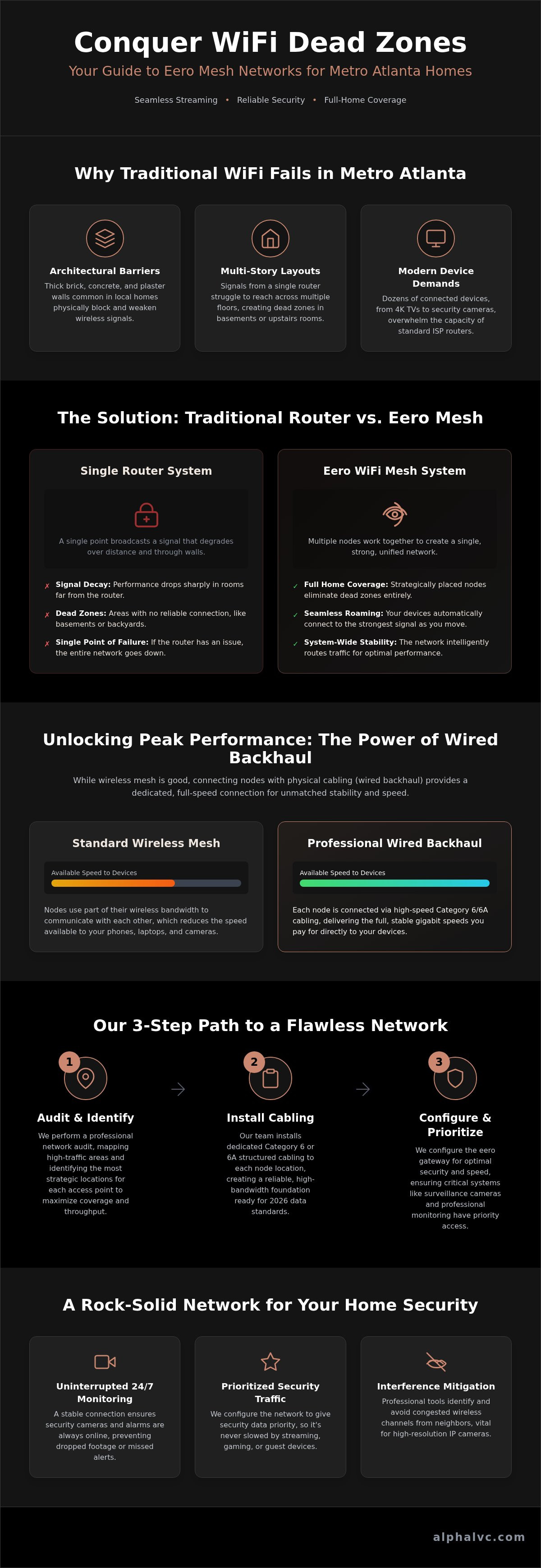
While wireless setups are convenient, they often fail to deliver the speeds you pay for. A wifi mesh with eero works best when nodes connect via a physical cable, a method known as wired backhaul. Wireless nodes must use part of their bandwidth just to talk to each other. This reduces the speed available to your devices. By using structured cabling, each node receives a direct, full-speed connection from the main router, ensuring your network isn't slowed down by its own internal communication.
AlphaLVC ensures your network hits gigabit speeds by running dedicated lines to every access point. This removes the instability caused by building materials or electronic interference. Before we pull any cable, we perform a professional network audit to map out your home's specific layout in metro Atlanta. This process identifies exactly where nodes should sit to avoid overlap and maximize throughput. If you're tired of intermittent signals, our network infrastructure services provide the hardwired foundation your home needs for 2026 technology.
Steps to Achieve Maximum Throughput
Achieving peak performance requires a methodical approach to infrastructure. We follow these three steps to optimize every wifi mesh with eero installation:
- Step 1: We identify high-traffic areas like home offices and media rooms where device clusters are densest and data demand is highest.
- Step 2: Our team installs Category 6 or 6A cabling to key node locations, providing the bandwidth necessary for 2026 data standards.
- Step 3: We configure the eero gateway for optimal security and speed, ensuring your surveillance cameras and monitoring systems have priority access.
Professional eero Installation: Integrating WiFi with Home Security
A security system is only as reliable as the network supporting it. Surveillance cameras and access control systems require a dedicated backbone to handle constant data transmission without interruption. If your network stutters, your security footage might skip or drop entirely. Integrating a wifi mesh with eero provides the stability needed for 24/7 professional monitoring. This setup ensures your system remains connected to the monitoring center even when other household devices are streaming heavy data.
AlphaLVC specializes in the seamless integration of network hardware with surveillance camera installation. We prioritize security traffic to ensure your safety devices never lose bandwidth to a gaming console or a guest's smartphone. A professionally installed network is the foundation of any reliable security system installation.
Why Professional Setup Outperforms DIY
- Precise frequency management to avoid neighbor network overlap.
- Dedicated bandwidth allocation for security and surveillance hardware.
- Ongoing support and maintenance to keep your integrated technology updated for 2026 standards.
Build a Faster and More Secure Network
A reliable home network is the critical infrastructure that keeps your home office running and your family safe in 2026. By choosing a wifi mesh with eero and prioritizing wired backhaul, you eliminate the common frustrations of buffering and dropped signals. Precision matters. Our team brings deep expertise in structured cabling and network wiring to every project. We ensure your system provides seamless integration with professional surveillance and supports 24/7 professional monitoring without interruption. Professional installation removes the guesswork and provides a stable foundation for all your connected devices. Don't settle for intermittent coverage when consistent gigabit speeds are within reach. Schedule a network consultation for your metro Atlanta home with AlphaLVC today. We're ready to help you create a seamless and dependable digital environment.
Frequently Asked Questions
Is eero compatible with professional security systems?
Yes, eero is fully compatible with professional security systems and provides the stable connection required for 24/7 professional monitoring. It supports the high uptime demands of access control and surveillance hardware. By integrating a wifi mesh with eero, you create a dedicated pathway for security data. This prevents your safety systems from dropping offline when other household devices are streaming or gaming.
How many eero nodes do I need for a 4,000 square foot home in metro Atlanta?
A 4,000 square foot home in metro Atlanta typically requires three to four nodes to ensure complete coverage. The exact count depends on your specific floor plan and construction materials like brick or thick plaster. Multi-story homes often need nodes placed strategically on each level to maintain signal strength. A professional network audit is the most accurate way to determine the ideal node count.
What is the difference between wireless mesh and a hardwired access point?
Wireless mesh nodes talk to each other over the air, while hardwired access points use physical cables for data transfer. Using structured cabling for your wifi mesh with eero, known as wired backhaul, eliminates the speed loss associated with wireless-only setups. This method provides a more reliable connection for fixed devices. It's the preferred choice for maintaining high-performance surveillance and home security systems.
Can eero handle 4K surveillance camera streams without lagging?
The 2026 eero hardware is fully capable of handling 4K surveillance camera streams without lagging. These systems are built to manage the high bandwidth requirements of modern high-definition security feeds. To ensure the best performance, we often use network wiring to support nodes near your cameras. This professional approach guarantees that your video streams remain clear and consistent even during peak network usage.


