
Is Your Network Closet a Tangle of Cables? How to Clean It Up the Right Way

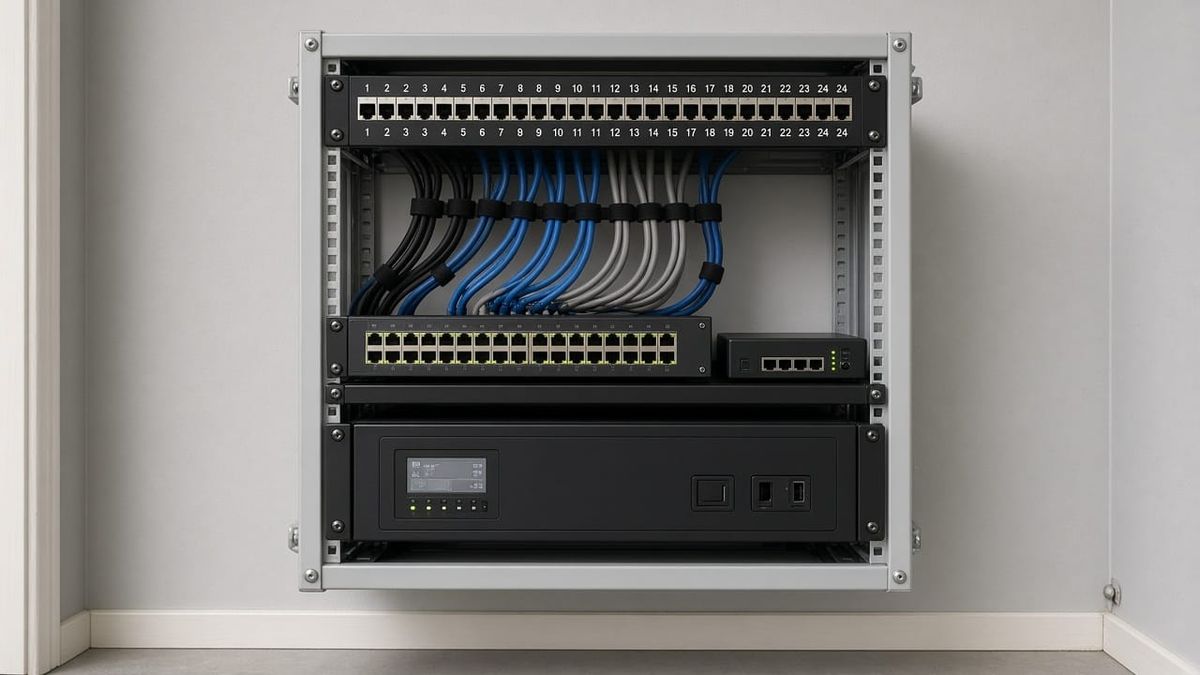
Open the closet where your internet comes into the building. If you see a modem balanced on a shelf, a router stacked on top of a switch, power strips daisy-chained across the floor, and a knot of cables nobody wants to touch, you are not alone. Many homes and small offices in Marietta, Kennesaw, Woodstock, Roswell, and Alpharetta grew their networks one device at a time, and the closet shows it.
A messy closet is more than an eyesore. It makes outages harder to fix, invites accidental unplugs, and can quietly shorten the life of your equipment. The good news is that a clean, organized setup is usually a one-time project.
Why a Tangled Closet Causes Real Problems
- Slow troubleshooting. When a camera, access point, or office PC drops offline, someone has to trace the right cable. Without labels, that means guessing and unplugging things.
- Accidental outages. Loose cords get bumped, pulled, or unplugged when someone stores boxes or vacuums the closet.
- Heat. Equipment stacked tightly with no airflow runs hot. Heat is a common reason for random reboots and early failures.
- No room to grow. Adding cameras, a new access point, or another office desk becomes a project when there is no free switch port or space to mount anything.
What a Clean Network Closet Looks Like
A rack or wall-mount enclosure
Instead of a shelf, equipment mounts in a small wall-mount rack or cabinet sized for what you have plus room to grow. Everything has a place, and nothing sits on the floor.
A patch panel for in-wall cabling
The Cat6 cables coming from rooms, cameras, and access points terminate on a patch panel. Short patch cords then connect the panel to the switch. That keeps the permanent in-wall wiring protected and makes changes as simple as moving a short cord.
Labels on both ends
Every port on the patch panel matches a labeled jack, camera, or access point. A simple printed map stays in the closet. When something goes down, you can see exactly which cable serves it. (Not sure whether your existing wall jacks are even connected? We covered that in our post on unused Ethernet jacks.)
Right-length cords and cable management
Short, color-coded patch cords and horizontal cable managers replace long loops of extra cable. It looks better, and it makes every connection easy to see and reach.
Battery backup and clean power
A properly sized battery backup (UPS) keeps the modem, router, and switch running through brief power blips, and it helps protect equipment from sudden shutdowns. If your cameras or alarm communicator depend on the network, that backup matters even more. A single rack-mounted power strip replaces the pile of adapters on the floor.
Airflow
Equipment needs breathing room. That can mean spacing devices out, using a vented enclosure, or adding a small fan in a closed closet. The goal is simple: keep the gear from cooking itself.
A PoE switch with spare ports
A Power over Ethernet (PoE) switch powers cameras, access points, and some access control devices over the same cable that carries data. That means fewer power bricks in the closet and in the ceiling. Planning a few spare ports now makes the next upgrade easy.
Homes vs. Small Offices
At home, the closet often holds the internet modem, a router or mesh base, and maybe a camera recorder. A compact wall-mount setup with a small patch panel and UPS is usually plenty.
In a small office or shop in Smyrna, Canton, or Sandy Springs, the closet may also feed desk drops, phones, a camera NVR, and door readers. There, good labeling and documentation are essential, so whoever is on site can tell an IT vendor or installer exactly what is plugged in where.
Do You Need to Start Over?
Usually not. Most cleanups reuse the existing in-wall cabling and much of the equipment. The work is in re-terminating cables onto a patch panel, mounting gear properly, replacing the spaghetti with right-length cords, adding backup power, and documenting it all. If we find damaged or unsuitable cable along the way, we will tell you what is worth replacing and what is fine to keep.
Get Your Network Closet Organized
AlphaLVC installs structured Cat6 cabling, network racks, patch panels, PoE switching, and Wi-Fi systems, and we leave every job looking clean. We are a local, licensed low-voltage contractor (Georgia license LVU406567) serving homes and businesses in Cobb, Cherokee, and Fulton counties, including Acworth, Alpharetta, Canton, Johns Creek, Kennesaw, Mableton, Marietta, Roswell, Sandy Springs, Smyrna, and Woodstock.
Call or text 470-295-5382 or email info@alphalvc.com. Send us a photo of your closet, and we will tell you what it would take to get it organized.